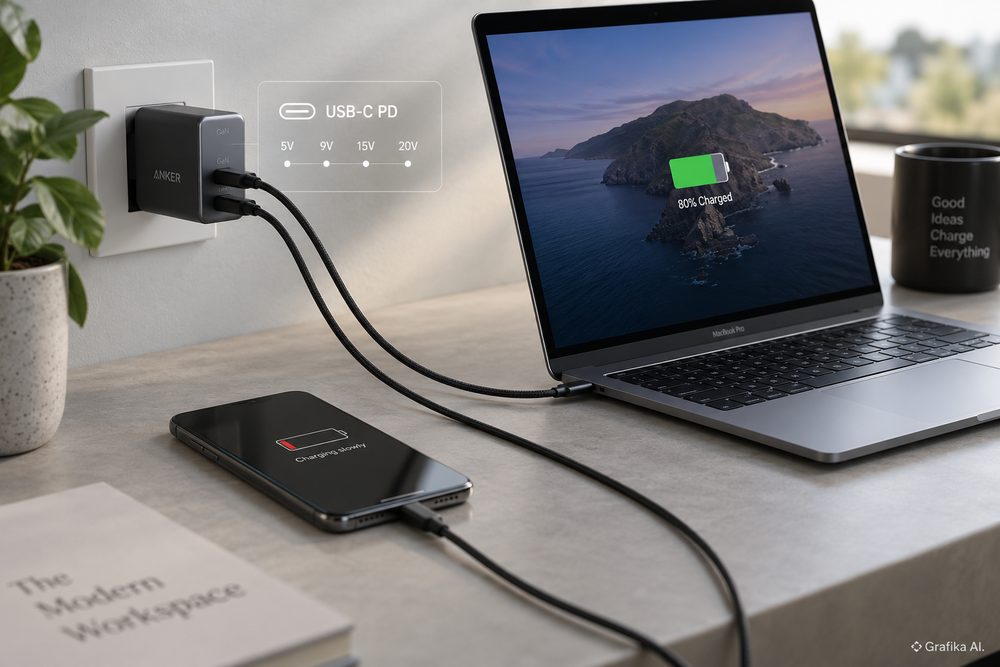
A 100 W USB-C charger does not send 100 W into every device connected to it. Nor does a 65 W laptop adapter automatically overwhelm a phone designed to charge at 20 or 30 W. The wattage printed on the charger is a maximum capability, not a fixed output. What actually reaches the battery is determined by a negotiation between the charger, the device and, at higher power levels, the cable.
That distinction explains most cases in which one USB-C charger works perfectly with a laptop but behaves differently with a phone. Sometimes the phone charges, but much more slowly than expected. Sometimes “fast charging” never appears. And if a modern, standards-compliant phone literally refuses to charge at all from a standards-compliant USB Power Delivery charger, the problem is usually not that the charger is “too powerful”. At that point, suspect the cable, connector, charging protocol implementation or hardware before blaming the wattage figure.
A USB-C plug tells you almost nothing about the power behind it
USB-C describes the connector. USB Power Delivery, usually shortened to USB PD, describes one of the systems used to negotiate power through that connector. Two chargers can therefore have identical USB-C sockets while behaving quite differently electrically.
A simple USB-C connection can operate at 5 V without establishing a full Power Delivery contract. USB-C also provides mechanisms for advertising available current at that voltage. USB PD adds digital communication over the Configuration Channel, or CC, pins and allows the two devices to negotiate higher voltages and substantially more power.
The important sequence is straightforward:
-
The charger and device detect each other through the USB-C CC connection.
-
The source begins from a safe USB-C power state rather than blindly applying its highest voltage.
-
A PD-capable charger advertises its available power combinations.
-
The phone or laptop selects an acceptable combination.
-
Only after the request is accepted does the charger move to the negotiated operating point.
In USB PD terminology, the options advertised by the charger are described using Power Data Objects, or PDOs. The device being charged sends a Request Data Object, or RDO, selecting what it wants.
This is the part often simplified in product descriptions as “PD profiles”.
For ordinary Standard Power Range — SPR — USB PD, the familiar fixed voltages are:
-
5 V
-
9 V
-
15 V
-
20 V
The available current depends on the charger’s design and power rating. Under USB PD power rules, increasingly powerful sources are required to cover the lower standard voltage levels as well. A typical properly implemented 65 W laptop charger might therefore advertise something close to:
-
5 V × 3 A = 15 W
-
9 V × 3 A = 27 W
-
15 V × 3 A = 45 W
-
20 V × 3.25 A = 65 W
The phone does not receive 20 V merely because 20 V is available. A phone wanting, for example, a roughly 9 V charging mode requests an appropriate operating point. The charger then supplies that voltage, while the phone’s charging circuitry controls how much current it actually draws within the negotiated limit.
This is why a properly designed 100 W laptop charger is normally safe for a 20 W phone. High charger wattage gives the device more options; it does not force it to consume the full rated power.
There is one practical complication: the number printed in large type on the front of a charger tells you only its maximum. The useful information is the small output table on the charger or its specification sheet. Two products advertised as “65 W USB-C” can differ in supported charging modes, particularly once programmable charging enters the picture.
For buyers in Poland and the rest of the EU, compatibility is gradually becoming less chaotic. The EU common-charger rules already cover categories including smartphones and tablets, and since 28 April 2026 they also apply to covered laptops. For devices within the scope of those rules, equipment capable of wired charging above the defined 5 V, 3 A or 15 W thresholds must support USB Power Delivery. Manufacturers must also provide information about the minimum and maximum charging power supported by the device.
That improves baseline interoperability. It does not mean every USB-C charger will unlock every manufacturer’s fastest proprietary charging mode.
Fixed PDOs, PPS and EPR are three different pieces of the puzzle
The biggest mistake when comparing chargers is looking only at watts.
Imagine a phone designed to reach its best wired charging performance using USB PD PPS, while a laptop mostly relies on fixed 15 V or 20 V PDOs. A charger can be excellent for the laptop and mediocre for the phone even when its maximum wattage is far above the phone’s requirement.
PPS — Programmable Power Supply — is part of the USB PD ecosystem and is particularly useful for battery charging. Instead of choosing only one fixed voltage such as 9 V or 15 V, the phone can ask a PPS charger to adjust its output dynamically within an advertised range.
PPS supports voltage adjustments in 20 mV steps and current-limit adjustments in 50 mA steps. That gives the phone much finer control over the conversion process. Rather than receiving a fixed higher voltage and turning more of the difference into heat inside the handset, the charging system can repeatedly request a voltage better matched to the battery and its internal charge-pump architecture.
This matters because battery charging power is not constant from 0 to 100 percent. High power is normally used only during part of the charging cycle. As battery voltage, state of charge and temperature change, the phone reduces or adjusts its demand.
Samsung provides a good real-world example. Its current 45 W USB-C adapter supports USB PD 3.0 PDO and PPS, and Samsung identifies PPS as part of its Super Fast Charging implementation. The manufacturer also specifies an appropriate 5 A USB-C cable for optimum 45 W operation on supported devices.
Connect the same compatible Galaxy phone to a powerful laptop charger that supports fixed PD voltages but not the required PPS capabilities and the result is usually not a dead phone. More commonly, it falls back to a slower PD charging mode. The charger may say 65 W or 100 W on its case, yet the phone can still charge more slowly than with a nominally weaker 45 W PPS adapter.
Apple takes a somewhat different approach, but the basic PD principle is the same. Current USB-C iPhones can be charged from a standards-compliant USB-C PD laptop adapter. Apple explicitly supports higher-wattage USB-C adapters for iPhone charging; the phone simply negotiates what it can use. On supported current models, Apple’s fast-charge specifications start with USB PD-compatible adapters rather than requiring a charger dedicated exclusively to the iPhone.
Then there is Extended Power Range, or EPR.
SPR reaches up to 100 W, with 20 V × 5 A providing the top end of that range. EPR extends USB Power Delivery to 240 W and introduces higher fixed voltages:
-
28 V × 5 A = 140 W
-
36 V × 5 A = 180 W
-
48 V × 5 A = 240 W
Those levels are mainly relevant to high-performance laptops, workstations, monitors and other equipment that needs far more power than a phone.
EPR does not make a charger dangerous to a normal smartphone. An EPR charger still negotiates power with the connected device. A phone that has no use for 28, 36 or 48 V does not request those voltages.
The cable, however, becomes critical.
A normal USB-C cable capable of 3 A can carry up to 60 W at 20 V. Going above 3 A requires a cable capable of 5 A operation and electronic identification. These cables contain an E-Marker, which lets connected equipment determine relevant cable capabilities.
That produces a useful rule when diagnosing laptop charging:
20 V × 3 A = 60 W.
If your 65 W laptop charger and laptop support 65 W but the cable is limited to 3 A, that cable cannot carry the charger’s full 65 W operating point. A proper higher-current cable is required. For EPR power, use an EPR-capable cable.
USB-IF’s current certified USB-C-to-USB-C cable marking scheme uses 60 W and 240 W power markings. Older 100 W cables are still found in homes and shops, so the market remains less tidy than the modern logos suggest.
Also remember that charging power and data speed are separate properties. A cable can be perfectly suitable for high-power charging while supporting only basic USB 2.0 data rates. Conversely, an expensive high-speed USB cable does not automatically mean every charging mode will work unless its power capability is also appropriate.
When the laptop charges and the phone does not, diagnose the problem in this order
First establish what “does not work” actually means. There are three very different faults that users often describe with the same sentence:
-
the phone does not charge at all;
-
it charges, but only slowly;
-
it charges normally but does not enter the manufacturer’s fastest charging mode.
Slow charging is often a profile or protocol problem. Zero charging usually is not.
Start with the charger label. Ignore the headline wattage and look for the actual output modes. A useful specification might read something like:
5 V ⎓ 3 A, 9 V ⎓ 3 A, 15 V ⎓ 3 A, 20 V ⎓ 3.25 A
If the charger supports PPS, there should normally also be a programmable voltage range listed in its technical specifications.
Then check the phone specification. Look specifically for terms such as:
-
USB Power Delivery / USB PD
-
PPS
-
the manufacturer’s proprietary protocol;
-
maximum wired charging wattage.
Do not assume that “45 W charging” on the phone and “65 W output” on the charger automatically overlap. The phone needs a charging mode that the charger actually advertises.
Next, replace the cable.
This is the cheapest and fastest diagnostic step, and it fixes an irritating number of supposed “charger incompatibility” cases. USB-C cables fail internally, develop damaged CC connections, use inadequate conductors or simply do not support the current required for the desired power level.
For a phone, test with a short, known-good USB-C-to-USB-C cable from a reputable manufacturer. For charging above 60 W, verify that the cable has the required higher-power capability.
If the charger works only when the cable is inserted in one orientation, stop treating it as a software problem. USB-C is reversible. Orientation-dependent behaviour points strongly toward connector, cable or port damage/contamination.
Inspect the phone’s USB-C socket next. Pocket lint packed into the bottom of the receptacle can prevent the plug from seating completely even though it appears connected. The result can range from intermittent charging to missing high-current or data functions.
Do not scrape the connector with a metal needle. Power the device down and use a safe cleaning method appropriate to the manufacturer’s instructions. If the port is physically loose, cleaning will not solve worn contacts.
Temperature is another overlooked variable. Modern phones actively limit battery charging when they become too hot or too cold. A device may therefore accept a PD contract but reduce the actual battery power dramatically. Fast charging is particularly sensitive because battery temperature, charger temperature and internal power-conversion losses all matter.
Multiport GaN chargers introduce another nuisance. A charger advertised as 100 W may provide 100 W only when one specific USB-C port is used alone. Connect a second device and the charger may redistribute its power budget — for example, 65 W to one port and 30 W to another. Some chargers briefly interrupt output while renegotiating that allocation. That interruption is normal for certain designs, but repeated disconnect/reconnect cycles are not something you should simply accept.
Check the per-port power table, not just the charger’s total wattage.
Older or poorly implemented USB-C hardware creates the hardest cases. Early and cheap devices occasionally implemented USB-C charging incorrectly, particularly the CC circuitry required for proper USB-C-to-USB-C detection. Such a device might charge from an old USB-A charger with an A-to-C cable yet refuse to charge from a technically superior USB-C PD adapter.
That is not evidence that USB PD is incompatible with the device. It can indicate that the device never implemented USB-C correctly in the first place.
Proprietary charging protocols also deserve some scepticism. Technologies from individual phone manufacturers can exceed or supplement standard PD behaviour and may require a matching charger, cable or both for maximum performance. On newer equipment covered by the EU common-charger rules, an additional proprietary protocol cannot be used to cripple the required USB PD functionality. It can still provide performance beyond the standard PD mode implemented by that device.
Finally, remember the strongest diagnostic clue: a compliant high-wattage USB PD charger should not be rejected by a compliant USB-C phone merely because its wattage is high. If a phone draws absolutely nothing from a known-good PD charger and known-good C-to-C cable, test another charger and inspect the phone before buying a lower-wattage adapter.
FAQ: USB-C charger compatibility
Can a 100 W or 140 W laptop charger damage a 20 W phone?
Not if the charger and phone correctly implement USB-C and USB Power Delivery. The power rating is the charger’s maximum capacity. The phone requests a supported voltage and controls the current it consumes within the negotiated contract.
Does a 65 W charger always charge faster than a 30 W charger?
No. If the phone accepts a maximum of 25 W, both chargers may deliver essentially the same result. A 30 W charger supporting the phone’s preferred PPS mode can also outperform a 65 W charger that lacks it.
Why does my phone show “charging” but not “fast charging”?
The most common reasons are missing PPS or another required protocol, an unsuitable cable, thermal limiting, a high battery state of charge or a multiport charger that has reduced the power available to that USB-C port.
What is a PDO?
A Power Data Object is part of the information a USB PD source advertises about the power it can provide. Fixed PDOs describe defined voltage/current capabilities. The receiving device chooses a compatible option through the PD negotiation.
What is PPS?
Programmable Power Supply allows compatible devices to request adjustable voltage rather than relying exclusively on fixed 5 V, 9 V, 15 V or 20 V PDOs. PPS uses fine voltage and current-control increments and is widely used for efficient high-speed phone charging.
What is the difference between SPR and EPR?
Standard Power Range covers USB PD operation up to 100 W. Extended Power Range expands the system to 240 W using additional 28 V, 36 V and 48 V operating levels. EPR also requires appropriate EPR-capable cables and hardware.
Do I need a 5 A cable for my phone?
Only when the charging system requires more current than a standard 3 A cable can provide. Some high-power phone charging implementations use 5 A-capable cables even though their total wattage is far below laptop-class EPR levels. Follow the phone manufacturer’s requirement rather than judging from wattage alone.
Why can the same cable charge my laptop but fail with my phone?
A damaged connector can affect individual CC contacts differently, a worn phone socket may not seat properly, or the phone and laptop may negotiate different modes. Charging one device successfully proves that the cable is not completely dead; it does not prove every conductor and negotiation path is functioning correctly.
Should I buy a charger with exactly the same wattage as the phone?
No. Choose a charger whose supported protocols and output ranges cover the phone’s requirements. Having additional power capacity is useful for laptops and other devices and does not force excess wattage into the phone.
What should I check first if charging does not work?
Check the charger’s printed output modes first, then test one known-good USB-C-to-USB-C cable. If the charger supports the phone’s required PD/PPS mode and the replacement cable changes nothing, inspect the phone’s USB-C port and test the phone on another known-good PD charger. Do not start by replacing a 65 W or 100 W charger with a weaker one simply because the phone needs fewer watts — remove the cable or protocol mismatch first.