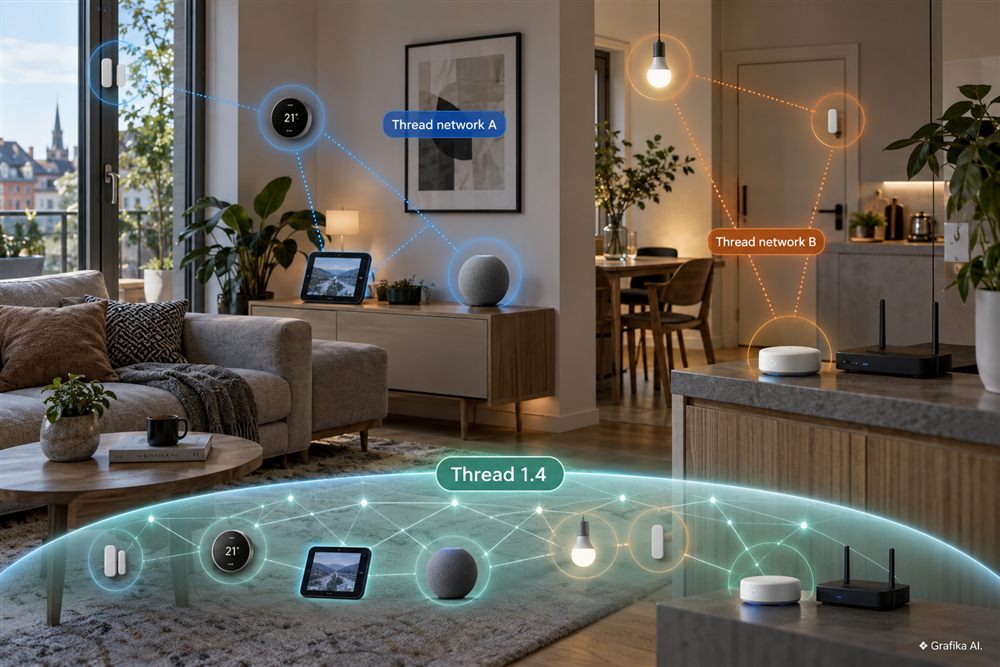
A Matter sensor added from an iPhone can end up on one Thread network, while another device commissioned a few minutes later through Google Home can land on a completely different one. Both devices sit in the same home, both appear in the same smart-home setup, and both use Matter-over-Thread — yet at the radio level they belong to separate meshes.
That is not a Thread failure. It is a consequence of how early ecosystem implementations stored, selected, and shared Thread network credentials.
The problem becomes especially visible in homes where Apple Home, Google Home, Home Assistant, Samsung SmartThings, and devices from several vendors coexist. Each ecosystem may have its own Thread Border Router, and if a new border router does not receive the credentials for an existing Thread network during setup, the easiest technical fallback is to create another one.
The result is messy. A HomePod mini may serve one mesh, a Nest Hub another, and Home Assistant a third. Matter devices can still be exposed to multiple ecosystems, but some of the benefits of having one larger, more resilient Thread mesh are lost.
Thread 1.4, released by the Thread Group in September 2024, was designed in part to reduce exactly this kind of fragmentation. The most relevant change is standardized Thread Credentials Sharing. It does not, however, magically merge three existing Thread networks into one.
Matter does not mean every device uses the same Thread network
The most common misunderstanding is simple: Matter and Thread solve different problems.
Matter is an application-layer standard. It defines how devices identify themselves, establish trust, expose capabilities, get commissioned, and communicate with controllers. Thread is an IPv6-based mesh network running over IEEE 802.15.4 in the 2.4 GHz band.
That means a single Matter smart home can sit on top of several independent Thread networks.
Joining a Thread network requires more than knowing its name. The critical piece is the Active Operational Dataset — the collection of parameters that defines a specific mesh. It includes, among other things:
- Network Key — a 128-bit network key,
- Extended PAN ID — a 64-bit extended network identifier,
- PAN ID,
- the IEEE 802.15.4 channel,
- the Thread network name,
- Mesh-Local Prefix,
- PSKc,
- security-policy parameters.
The Network Key is 16 bytes, as is PSKc, while the Thread network name can be up to 16 bytes long. Two border routers belong to the same Thread network because they use the same operational dataset — not because both boxes carry a Matter or Thread logo.
Consider a fairly typical setup. A user first installs a HomePod mini and commissions a Matter-over-Thread sensor from an iPhone. Apple already has access to the Thread credentials it manages, so those credentials can be provided during commissioning.
Several months later, the user adds a Google device that can also operate as a Thread Border Router. If its software does not receive the dataset for the existing Thread network, it cannot simply guess the keys. Historically, the practical fallback in many implementations was to create a new Thread network.
Android has its own mechanism for storing preferred Thread credentials through Google Play services. Google’s implementation model encourages new border routers to retrieve Preferred Thread Network Credentials before generating a fresh network. Apple follows a comparable concept through its Thread networking framework and iCloud Keychain.
The problem is that ecosystem-specific credential stores did not necessarily give unrelated platforms a universal, vendor-neutral way to retrieve credentials for an already running mesh.
This is where another important distinction appears: Matter Multi-Admin does not solve the Thread-network problem.
A Matter device can belong to more than one Matter Fabric. For example, the same accessory can be controlled from Apple Home and Google Home at the same time. A Fabric, however, is a Matter security domain. It is not the same thing as a physical Thread network.
In practical terms, sharing a Matter light from Apple Home to another ecosystem does not automatically move that device from one Thread mesh to another.
That distinction matters enormously when diagnosing a mixed smart-home installation.
Three Thread networks can work — but there is a real cost
Having two or three Thread meshes in the same home does not automatically mean the system is broken. Matter is based on IP networking, and traffic can be routed through Thread Border Routers into the broader home network.
There is no rule that says an entire household must use exactly one Thread network.
Still, from a practical standpoint, one shared Thread network is usually the better architecture.
The most obvious reason is coverage. Thread is a mesh network, and mains-powered Thread devices that are capable of routing can help forward traffic for other nodes. But if six devices belong to network A and another six belong to network B, they do not form one twelve-device mesh.
A router-capable node on network B does not strengthen network A just because the devices are sitting 50 cm apart.
Fragmentation can therefore reduce:
- route redundancy,
- usable mesh coverage,
- the number of available neighboring routers,
- the ability to use all Thread Border Routers as part of one resilient topology.
The other major annoyance is diagnostics.
A user may see three products described as Thread Border Routers and assume all three are strengthening the same mesh. They may not be.
Home Assistant makes this problem relatively easy to spot because its Thread integration can discover border routers through mDNS/DNS-SD and group them according to the Thread networks they belong to. You can therefore end up seeing an Apple network, a Google network, and a Home Assistant network separately.
Discovery alone is not the same as credential access. A border router can advertise its existence on the LAN without revealing its Network Key.
That matters when deciding whether to “fix” the topology.
If the installation is stable, there is little reason to factory-reset half the house just because a diagnostic screen reveals two meshes. Migrating existing Thread devices can create more disruption than leaving two healthy networks alone, especially when the devices involved are locks, leak sensors, blinds, or accessories mounted in awkward locations.
The order of operations should be more disciplined.
Priority 1: confirm that you really have multiple Thread networks.
Do not count border routers. Count distinct operational datasets or distinct networks as reported by a tool that can identify them.
Priority 2: identify which Thread network has the strongest infrastructure.
If one mesh already has two HomePods and an Apple TV positioned around the home while another has a single border router in the hallway, the first network is usually the better candidate for future expansion.
Priority 3: before adding another Border Router, try to join it to the existing network instead of letting it create a new one.
This matters especially with platforms such as Home Assistant and other implementations that expose Thread dataset management more explicitly.
Factory reset should be the last step, not the first.
Resetting a Matter-over-Thread device often means recommissioning it, rebuilding room assignments, restoring automations, checking permissions, and sometimes physically reaching a device to scan a QR code or press a pairing button. With a dozen accessories, a theoretically “cleaner” topology can easily cost hours of unnecessary work.
There is also a radio-level downside. Separate Thread networks may use different IEEE 802.15.4 channels. All of them share the same crowded 2.4 GHz spectrum with Wi-Fi, Bluetooth, and Zigbee.
That does not mean two Thread meshes will immediately cause interference — Thread traffic is generally low-bandwidth — but creating extra independent networks provides no radio advantage and can make channel planning less predictable in dense installations.
Thread 1.4 tackles the cause, but it does not automatically clean up old fragmentation
The key feature here is Thread Credentials Sharing.
The underlying idea is straightforward: if a new ecosystem does not know the credentials of an existing Thread network, it should not immediately create another network. It should have a standardized way to securely obtain the credentials from an existing Thread Border Router.
Thread 1.4 formalizes that process.
A typical flow looks like this:
- an app needs Thread credentials but does not already have them;
- it discovers a Thread 1.4 Border Router that supports Credentials Sharing using DNS-SD;
- the user explicitly enables credential sharing and completes whatever authentication the vendor requires;
- the Border Router generates a random Thread Administration One-Time Passcode, or OTPC;
- the code is nine digits, commonly presented as three groups of three, and can also be represented as a QR code;
- both sides derive a temporary ePSKc — Ephemeral Pre-Shared Key for the Commissioner;
- the app establishes a protected DTLS session with the Border Router;
- after authentication, the app can retrieve the Active Operational Dataset and, where applicable, the Pending Operational Dataset;
- the dataset can then be stored securely or passed to the device or border router being commissioned;
- the temporary ePSKc is discarded when the session ends or times out.
The important security detail is that a Thread 1.4 Border Router is not permanently exposing its network credentials.
Credential sharing must be explicitly activated by the user, and the temporary access mechanism is designed for a limited session rather than indefinite reuse.
That is a much cleaner model than relying on unrelated cloud accounts or proprietary credential stores to somehow synchronize secret Thread keys across vendors.
There is still a major limitation.
Thread 1.4 does not mean every Matter-over-Thread product automatically supports this workflow.
The relevant parts of the chain must implement it: the Thread Border Router, its firmware, the commissioning application, and the platform managing onboarding. A Matter logo on the packaging does not guarantee support for Thread Credentials Sharing.
More importantly, Thread 1.4 does not automatically merge existing network A with existing network B.
Credentials Sharing is primarily a way to let new devices and new border routers obtain the credentials of the preferred existing mesh. In other words, it is designed to prevent additional fragmentation and make controlled migration easier.
That distinction will remain relevant for years because many homes already contain Thread products that were deployed before Thread 1.4 support became common.
A HomePod mini, Apple TV 4K, Nest Hub, Nest Wifi Pro, Home Assistant system, or another Thread-capable product may gain new functionality through software updates, but having Thread radio hardware says nothing by itself about the supported Thread certification level or whether Credentials Sharing has been implemented.
Google already uses its Preferred Thread Network Credentials model so compatible border routers can try to retrieve an existing dataset before creating another Thread network. Apple provides a similar preferred-network concept through its Thread networking APIs and credential storage. Thread 1.4 pushes this problem toward a standardized cross-vendor mechanism rather than leaving every ecosystem to solve it in isolation.
If I were building a new Thread installation from scratch, I would use one rule: establish the primary Thread infrastructure first, then add end devices.
I would not start by commissioning a random sensor from whichever phone happens to be nearby and only later think about border-router topology.
An existing home needs a different approach.
If two Thread meshes are stable, do not reset everything just to make the topology look cleaner. First stop creating additional networks. Configure the next Thread Border Router using existing preferred credentials or Thread Credentials Sharing where the full stack supports it.
Only when fragmentation is causing a real problem — poor coverage, weak redundancy, commissioning failures, or devices frequently becoming unreachable — does a deliberate migration of an older mesh become worth the disruption.
FAQ
Does Matter-over-Thread require a Thread Border Router?
Yes, if the Thread device needs to communicate beyond its local mesh, for example with a Matter controller connected through Wi-Fi or Ethernet. The Border Router routes IPv6 traffic between Thread and the infrastructure network. It is not simply a proprietary “Matter hub.”
Do two Thread Border Routers always strengthen each other?
No. They must belong to the same Thread network, meaning they use the same compatible Operational Dataset. Border routers on separate meshes do not create shared radio redundancy.
Can Apple Home and Google Home control the same Matter device?
Yes. Matter supports multiple administrators and multiple Fabrics. That does not automatically merge the Thread networks used by Apple and Google.
Will Thread 1.4 automatically merge an existing Apple Thread network with a Google Thread network?
No. Credentials Sharing provides a standardized way to transfer credentials for an existing mesh so new devices or border routers can join it. It is not an automatic mesh-merging system.
Is the nine-digit Thread 1.4 code a permanent Thread password?
No. The OTPC is a one-time code used to derive a temporary ePSKc and establish a protected DTLS session. It is not the permanent Network Key.
I already have two working Thread networks. Should I reset my devices?
Not if the installation is stable. First make sure new devices stop creating additional meshes. Migration is worth considering when fragmentation is causing measurable problems with coverage, redundancy, or commissioning.
What should I check first when diagnosing the problem?
Determine how many actual Thread Networks exist, not how many Border Routers you own. If your diagnostic tools show separate Apple, Google, and Home Assistant networks, the first objective is simple: do not create a fourth one.